
📌 What Is Arlo Support?
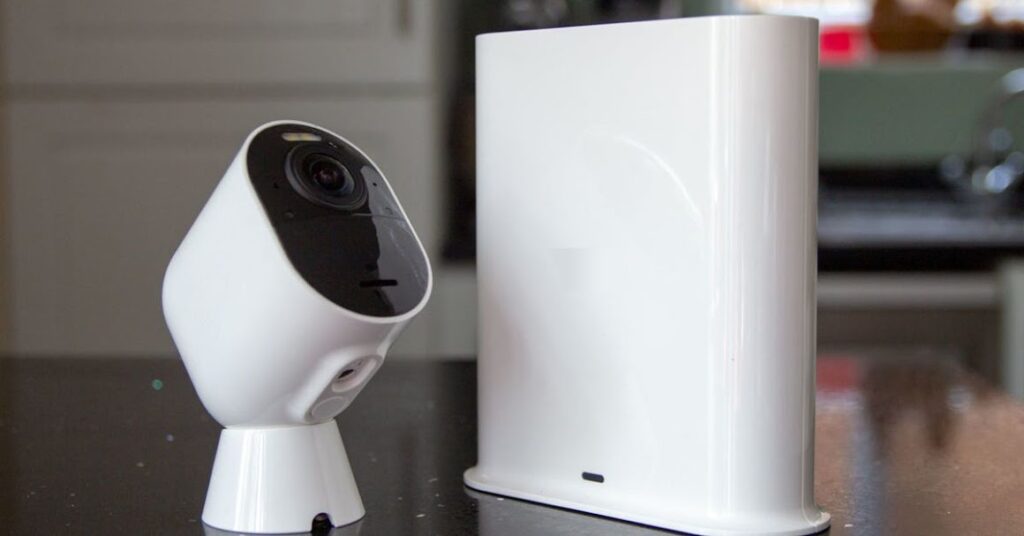
Arlo is a brand that specializes in smart home security products — including wireless security cameras, video doorbells, floodlight cameras, and security systems. Arlo Support is the official customer service and technical support team dedicated to helping customers resolve problems, answer questions, and guide you through setup, subscription features, troubleshooting, and more.
Arlo Support assists with several channels:
-
Phone support
-
Live chat
-
Support articles and videos
-
Arlo Community forums
-
Support within the Arlo App
-
Email support
Most support is free for a limited period after purchase (e.g., the first 90 days of a new device), then included with certain subscriptions.
☎️ Official Arlo Support Phone Numbers
Arlo’s official support varies by region, and there isn’t always a single global number available on public pages. Typically, numbers are shown on the official Arlo Support “Contact Us” pages once you log in or access localized support.
📱 Support Through the Arlo App (Recommended)
One of the easiest and most reliable ways to get help is directly through the Arlo App:
-
Open the Arlo App on your phone (iOS or Android).
-
Go to Settings > Support.
-
Select your Arlo product.
-
Choose from options like Help Articles, Live Chat, or Request a Callback.
This method usually provides faster routing to product-specific resources and support tailored to your registered devices
💬 Live Chat Support
Arlo offers an online Live Chat option from their official support site. To use it:
-
Go to the Arlo Support Contact page at arlo.com/support/contact.
-
Click the Chat icon (usually at the bottom right).
-
Chat first with a virtual assistant (“Artie”), and then escalate to a live agent if needed.
Live chat is especially helpful for troubleshooting steps, account questions, and guidance without waiting on phone hold.
📚 Self-Help Resources
Before contacting support, many common issues are resolved through Arlo’s extensive online support hub, which includes:
-
How-to articles
-
Tutorial videos
-
Troubleshooting guides
-
Manuals
-
FAQ pages
You can search by product or problem type
Examples of topics you’ll find valuable:
-
Camera offline
-
Setup issues
-
Battery problems
-
Notifications configuration
-
Cloud recording and account settings
👥 Arlo Community Forums
The Arlo Community is an official platform where users ask and answer each other’s questions — often with input from Arlo staff moderators. It’s a great place for real case experiences, alternative fixes, and product tips.
📧 Email Support
If you prefer or can’t get immediate phone/chat support, you can try email support. Legitimate Arlo customer support emails include:
When emailing, include:
-
Your device model
-
Purchase date and place
-
A clear description of the issue
-
Any screenshots or error messages
This helps Arlo respond faster.
📊 When You Should Contact Support
Here are situations where support can genuinely help:
✅ Hardware setup problems (camera not connecting)
✅ Sync issues between cameras and base station
✅ Subscription & billing questions
✅ Firmware and update problems
✅ Cloud access or storage issues
✅ Warranty replacement or defective device issues
✅ Arlo app or account login problems
📌 Tips for Faster Support
✔ Have your serial number and model name ready.
✔ Be prepared with account email and purchase info.
✔ If on phone, call during available support hours (based on your region).
✔ Use chat first for quick responses.
✔ If support seems slow, request a support case number so you can follow up.
📌 Arlo Support FAQ – Complete Guide
🧠 GENERAL SUPPORT QUESTIONS
1. What is Arlo Support?
Arlo Support is the official customer service and technical assistance team for Arlo smart home products — including cameras, video doorbells, floodlights, base stations, hubs, and security systems.
They help with:
✔ Product setup
✔ Troubleshooting errors
✔ Network & connectivity issues
✔ Subscription & account problems
✔ Warranty claims
✔ Feature explanation
Support can be accessed via phone, chat, email, app, and online resources.
2. How do I contact Arlo Support?
There are a few official ways:
📱 In the Arlo App
Settings → Support → Choose help method
💬 Live Web Chat
From the official Arlo support webpage
☎️ Phone Support
Available in some regions (numbers vary by country; often shown after login)
📧 Email Support
Typically customers receive support email via the contact forms
📝 Online Help Articles & Community
Search guides on Arlo’s support center
✔ Note: Official contact routes are only from the Arlo App or the official Arlo website — others may be illegitimate.
3. Are Arlo support phone numbers free?
It depends on your region and your subscription/package.
-
Some regions offer free phone support for registered devices
-
Others may require an active subscription plan
-
Official numbers are shown in your support dashboard after you sign in
⚠️ Avoid phone numbers from random websites — only use contact numbers provided inside the Arlo app or official site.
4. How long is Arlo support available?
Support availability varies by region and plan:
📍 Registered device support – often included for a limited time
📍 Subscription members – support typically included for active subscriptions
📍 Self-help articles – always available online
📍 Community forum – always available
📦 SETUP & INSTALLATION
5. How do I set up my Arlo camera?
Basic steps (may vary by model):
-
Download & open the Arlo App (iOS or Android)
-
Create or sign into your Arlo account
-
Tap Add Device
-
Select device type (camera, doorbell, etc.)
-
Follow the app prompts
-
Connect to Wi-Fi or Sync with Base Station
If setup fails, Arlo Support can walk you through.
6. My Arlo won’t connect during setup — why?
Common reasons:
⚠ Weak Wi-Fi signal
⚠ Incorrect Wi-Fi password
⚠ Router settings blocking devices
⚠ Device too far from Wi-Fi/base station
Tips:
✔ Move camera closer to router
✔ Restart router and Arlo device
✔ Use 2.4 GHz instead of 5 GHz (common requirement)
If that doesn’t fix it, contact support.
📶 CONNECTIVITY & NETWORK ISSUES
7. Why is my Arlo camera offline?
Your camera may appear offline if:
❌ Wi-Fi disconnected
❌ Base station disconnected
❌ Power issue (battery drained)
❌ Router resets or firewall issues
Quick fixes:
✔ Restart your router
✔ Reinsert batteries
✔ Move device closer
✔ Reset base station if needed
If offline persists, support can help verify logs and network settings.
8. What network settings should I adjust?
Arlo cameras work best with:
📍 2.4 GHz Wi-Fi (some models support 5 GHz)
📍 WPA2 security (recommended)
📍 Port forwarding typically not needed
Avoid:
⚠ VPN on your network
⚠ Guest Wi-Fi without device access
⚠ Captive portals (like hotel/public Wi-Fi)
Support can check compatibility if you have issues.
🧾 ACCOUNT & SUBSCRIPTIONS
9. What subscription plans does Arlo offer?
Arlo offers cloud storage plans that include:
✔ Cloud recordings
✔ Smart notifications (person, vehicle, package detection)
✔ Extended video history (30–60 days)
✔ Priority support (in some plans)
Basic free plans include limited features.
Subscription questions are often best handled through your account dashboard or Arlo Support.
10. My subscription isn’t working — what do I do?
First check:
✔ Active billing
✔ Plan type shown in app
✔ Correct subscription for your region
If the subscription was purchased but not applied, Support can verify your account and assist.
11. How do I cancel my Arlo subscription?
You can typically cancel:
📍 In the Arlo app under subscription settings
📍 Through the web dashboard
Support can help if you have trouble canceling or if charges are unclear.
📸 FEATURES & SETTINGS
12. How do I change motion detection settings?
In the Arlo app:
-
Tap your camera
-
Settings → Detection
-
Adjust sensitivity
-
Define activity zones (if supported)
Activity zones help reduce false triggers.
13. How do I enable notifications?
Go to:
📱 Arlo App → Camera → Notifications
Ensure:
✔ Permission is allowed on your phone
✔ App notifications are not muted
Support can walk you through if this doesn’t work.
🔧 TROUBLESHOOTING COMMON ISSUES
14. Camera won’t record or save video
Check:
✔ Subscription status
✔ Cloud storage availability
✔ Wi-Fi connectivity
✔ Camera battery or power
If all checks pass, Support can investigate recording errors and logs.
15. Audio or video quality issues
Low resolution or poor audio can be caused by:
📍 Low bandwidth
📍 Obstructions
📍 Camera placement
Optimizing the network or repositioning your device often helps.
🛡️ SECURITY & PRIVACY
16. Is my Arlo system secure?
Yes — Arlo uses encrypted connections to protect your video and data.
But you should also:
✔ Use strong, unique passwords
✔ Enable 2-factor authentication (2FA)
✔ Keep firmware updated
Support can help enable security features.
17. How do I enable two-factor authentication (2FA)?
In the Arlo app:
Settings → Security → Two-factor authentication
Follow the steps to protect your account.
🔁 UPDATES & FIRMWARE
18. Why should I update Arlo firmware?
Firmware updates:
✔ Improve performance
✔ Fix bugs
✔ Add new features
✔ Close security gaps
Typically, your Arlo devices auto-update, but sometimes a manual refresh helps.
19. How do I manually update my device?
In the Arlo app:
Device → Settings → Firmware → Check for updates
If updates fail, support can assist.
🛠️ WARRANTY & RETURNS
20. Is my Arlo device under warranty?
Most Arlo products come with a limited warranty (often 1–2 years depending on region).
Support can:
✔ Check warranty eligibility
✔ Advise on repair/replacement
✔ Help with warranty claims
21. How do I get a replacement for defective products?
Support can issue an RMA (Return Merchandise Authorization) if your device is defective or fails within warranty.
Provide:
✔ Serial number
✔ Proof of purchase
✔ Description of issue
💡 APP & ACCOUNT MANAGEMENT
22. How do I add/remove users on my Arlo account?
In the Arlo App:
Account → Users → Add/Remove
You can grant different access levels.
23. Why can’t my family member see the cameras?
Check:
✔ Shared account permissions
✔ Proper roles assigned
✔ App login with correct email
Support can guide through securely sharing access.
💬 SUPPORT CONTACT METHODS
24. How do I get live chat support?
Visit the official Arlo support page in your browser and look for the Chat icon — usually at the bottom right.
Live chat is effective for:
✔ Troubleshooting
✔ Account & subscription questions
✔ Quick answers
25. How do I get phone support?
Phone numbers vary by region and are typically shown after logging in or in the Arlo app. Not all regions have phone support.
Support will route you based on your location and device.
⚠ Always use the official site or app — not numbers from random searches.
26. How long does support take to respond?
Response time depends on:
✔ Contact method (chat is usually faster than email)
✔ Region and local support hours
✔ Issue complexity
Support will provide case references so you can follow up.
📚 SELF–HELP & COMMUNITY RESOURCES
27. Where can I find guides and solutions online?
Arlo has an official Support Center with:
✔ Articles
✔ Setup guides
✔ Troubleshooting steps
✔ Videos
Use the search bar on the Arlo support site to find answers.
28. What is the Arlo Community?
The Arlo Community is a forum where users ask questions, share solutions, and sometimes Arlo staff provide official replies. It’s useful for real-world problem solving.
🔍 COMMON ERROR MESSAGES
29. “Camera offline”, “Base station offline.”
Caused by:
✔ Network problems
✔ Power interruptions
✔ Router issues
Quick fixes are in the app, or ask support if it persists.
30. “Subscription required for this feature.”
Certain recordings or advanced notifications require an active Arlo subscription. Support can clarify which features are included.